

Birthday Reward
Show your customers some love by giving them bonus points on their birthday
Introduction
Show your customers some love by giving them bonus points on their birthday. Birthday rewards are an excellent way to increase customer engagement and build loyalty to your brand.
Customers can spend their birthday points on rewards or use them to unlock higher tiers.
Enabling Birthday Reward
Create the Rule
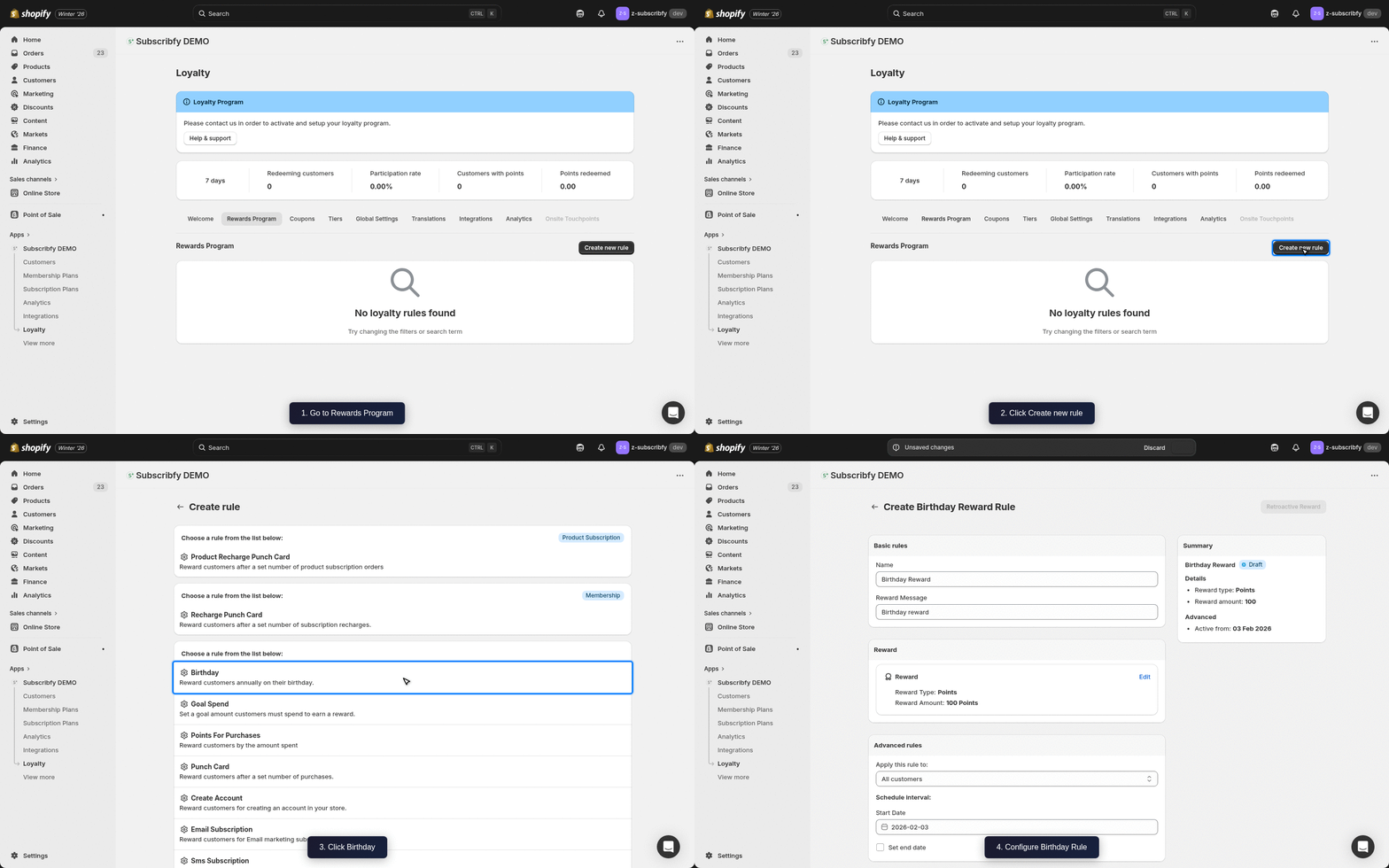
Go to Subscribfy → Loyalty → Rewards Program tab → Create new rule → Birthday Reward
Configure Basic Settings
| Setting | Description |
|---|---|
| Name | Display name shown to customers (e.g., "Birthday Surprise") |
| Reward Message | Message customers see when they receive their birthday reward |
Set the Reward
Choose how to reward customers on their birthday:
| Reward Type | Description |
|---|---|
| Points | Award a fixed number of points (e.g., 100 points) |
| Discount Code | Give a discount code (amount off, free shipping, or free product) |
Configure Advanced Settings (Optional)
| Setting | Description |
|---|---|
| Customer tags | Include or exclude customers by their Shopify tags |
| Schedule | Set start and end dates for the rule |
| Tier restriction | Limit which tiers can earn this reward |
Save
Click Save and make sure the rule status is ON.
How Customers Add Their Birthday
Customers must be logged in to save their birthday. They can add their birth date in two ways:
- Customer Portal - In the loyalty section of their account, customers can enter their birthday
- Checkout Extension - If you have the Customer Birthday checkout extension enabled (Shopify Plus only), customers can enter their birthday during checkout
Once saved, points are automatically awarded on their birthday.
Only the month and day are required. We store the date in MM/DD format. Once saved, customers cannot change their birthday.
When Are Birthday Points Awarded?
Birthday points are awarded automatically on the customer's birthday through an hourly system check. The check runs every hour based on the store's timezone setting.
Points are awarded once per year on the exact birthday date (matching month and day).
Tier Multipliers
Each tier has a points multiplier. When a customer earns birthday points, the base reward is automatically multiplied by their tier's multiplier.
Example: If you set 100 points as the birthday reward:
| Tier | Points Awarded |
|---|---|
| Bronze tier (1x multiplier) | 100 points |
| Silver tier (1.5x multiplier) | 150 points |
| Gold tier (2x multiplier) | 200 points |
You only need to create one birthday rule - the tier multiplier handles different reward amounts automatically.
Common Questions
Klaviyo Integration
If you have Klaviyo connected, Subscribfy sends a Subscribfy Birthday Reward Event when a customer receives their birthday reward.
Event Properties
| Property | Variable Name | Example Value |
|---|---|---|
| Reward Name | event.SubscribfyRewardName | Birthday Surprise |
| Reward Type | event.SubscribfyRewardType | points |
| Reward Amount | event.SubscribfyRewardAmount | 100 |
| Coupon Code | event.SubscribfyCouponCode | BDAY-ABC123 |
Tip: Create a Klaviyo flow triggered by "Subscribfy Birthday Reward Event" to send a personalized Happy Birthday email.
Best Practices
- Promote the birthday reward - Make sure customers know they can earn points by adding their birthday
- Set up tier multipliers - Tiers automatically multiply rewards, so higher tier members get bigger bonuses
- Set a meaningful reward - Make the birthday reward substantial enough to drive a purchase
Troubleshooting
Need help? Contact support at support@subscribfy.com