

Loyalty Program
Social Sharing Reward
Reward customers for following your brand on social media
Introduction
Grow your social media following by offering points when customers follow your brand. This helps increase your reach and engagement across platforms.
Enabling Social Sharing Reward
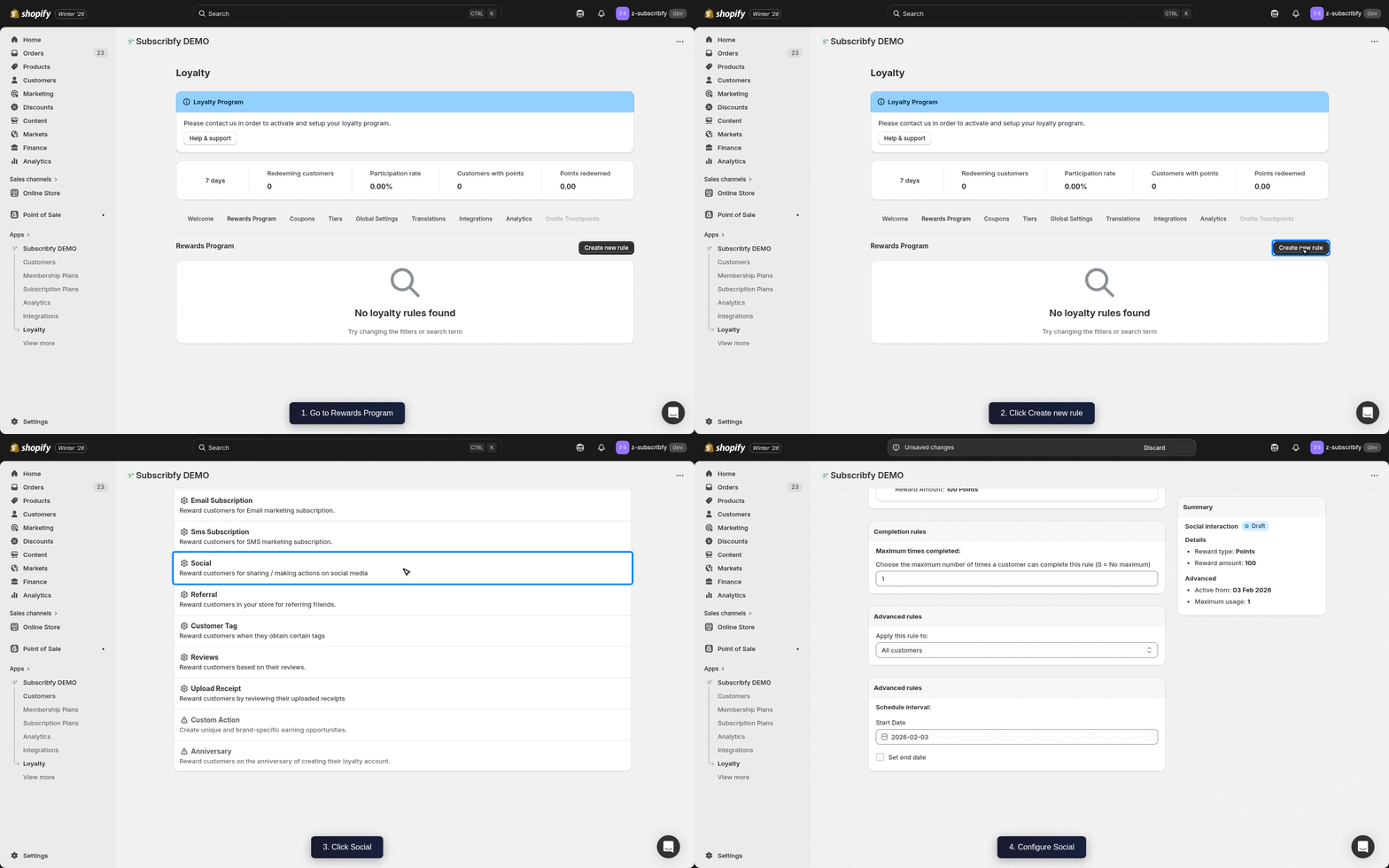
Create the Rule
Go to Subscribfy → Loyalty → Rewards Program tab → Create new rule → Social
Configure Basic Settings
| Setting | Description |
|---|---|
| Name | Display name (e.g., "Follow Us on Instagram") |
| Reward Amount | Points to award (e.g., 50 points) |
| Social Platform | Select the platform (Instagram, Facebook, Twitter, TikTok, etc.) |
| Social URL | Your social media profile URL |
Configure Advanced Settings (Optional)
| Setting | Description |
|---|---|
| Customer tags | Include or exclude customers by their Shopify tags |
| Tier restriction | Limit which tiers can earn this reward |
Save
Click Save and make sure the rule status is ON.
Supported Platforms
- Twitter/X
- TikTok
- YouTube
How It Works
- Customer clicks the social follow button in your loyalty widget
- They are redirected to your social profile
- After following, they return to your store
- Points are awarded automatically
Each social platform can only be earned once per customer.
Klaviyo Integration
If you have Klaviyo connected, Subscribfy sends a Subscribfy Social Event when a customer earns points for social follows.
Event Properties
| Property | Variable Name | Example Value |
|---|---|---|
| Reward Name | event.SubscribfyRewardName | Follow Us on Instagram |
| Reward Type | event.SubscribfyRewardType | points |
| Reward Amount | event.SubscribfyRewardAmount | 50 |
| Platform | event.SubscribfyPlatform |
Troubleshooting
Need help? Contact support at support@subscribfy.com