

Upload Receipt
Reward customers for uploading purchase receipts from retail stores
Introduction
Capture offline purchases by allowing customers to upload receipts from your retail stores or authorized retailers. This bridges the gap between online and offline loyalty tracking.
Enabling Upload Receipt Reward
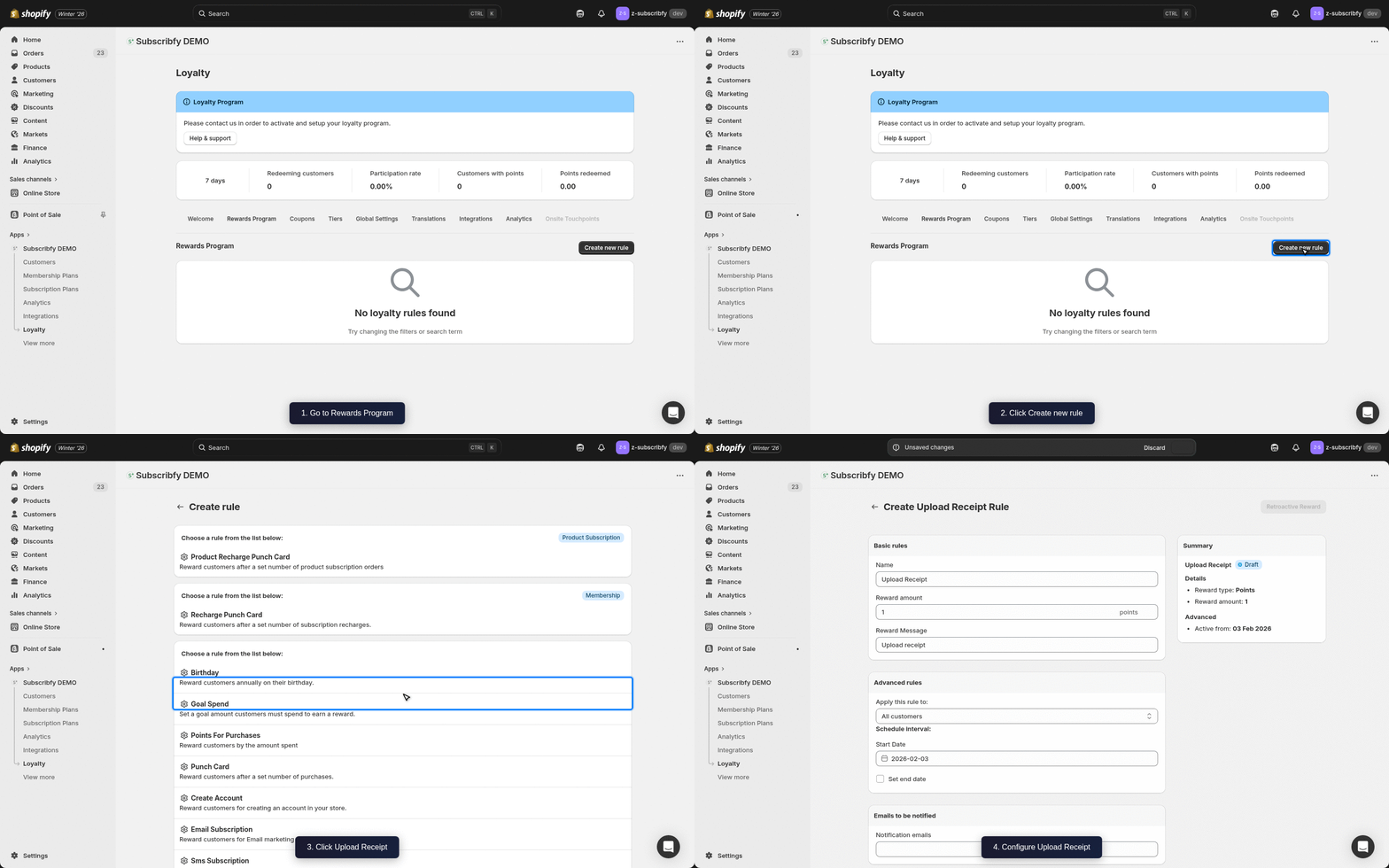
Create the Rule
Go to Subscribfy → Loyalty → Rewards Program tab → Create new rule → Upload Receipt
Configure Basic Settings
| Setting | Description |
|---|---|
| Name | Display name (e.g., "In-Store Purchase Points") |
| Points per dollar | Points to award per dollar spent (e.g., 1 point per $1) |
| Reward Message | Message shown when reward is earned |
Configure Advanced Settings (Optional)
| Setting | Description |
|---|---|
| Minimum amount | Minimum receipt amount to qualify |
| Maximum amount | Maximum receipt amount to process |
| Valid retailers | List of accepted store names |
| Customer tags | Include or exclude customers by their Shopify tags |
Save
Click Save and make sure the rule status is ON.
How It Works
- Customer makes a purchase at a retail location
- They upload a photo of their receipt in the loyalty widget
- Receipt is reviewed (manually or automatically)
- Points are awarded based on the receipt amount
Receipt Requirements
For successful processing, receipts should include:
- Store name
- Purchase date
- Item details
- Total amount
- Receipt number (for verification)
Receipts older than 30 days may not be accepted. Check your rule settings for the specific timeframe.
Review Process
Uploaded receipts can be reviewed in Subscribfy → Loyalty → Receipt Uploads.
| Status | Description |
|---|---|
| Pending | Awaiting review |
| Approved | Points awarded |
| Rejected | Receipt not valid |
Klaviyo Integration
If you have Klaviyo connected, Subscribfy sends a Subscribfy Upload Receipt Event when a customer's receipt is approved.
Event Properties
| Property | Variable Name | Example Value |
|---|---|---|
| Reward Name | event.SubscribfyRewardName | In-Store Purchase Points |
| Reward Type | event.SubscribfyRewardType | points |
| Reward Amount | event.SubscribfyRewardAmount | 50 |
| Receipt Total | event.SubscribfyReceiptTotal | $50.00 |
Troubleshooting
Need help? Contact support at support@subscribfy.com