

Loyalty Program
Reviews Reward
Reward customers for leaving product reviews
Introduction
Encourage customers to leave product reviews by rewarding them with points. Reviews build social proof and help other customers make purchasing decisions.
Enabling Reviews Reward
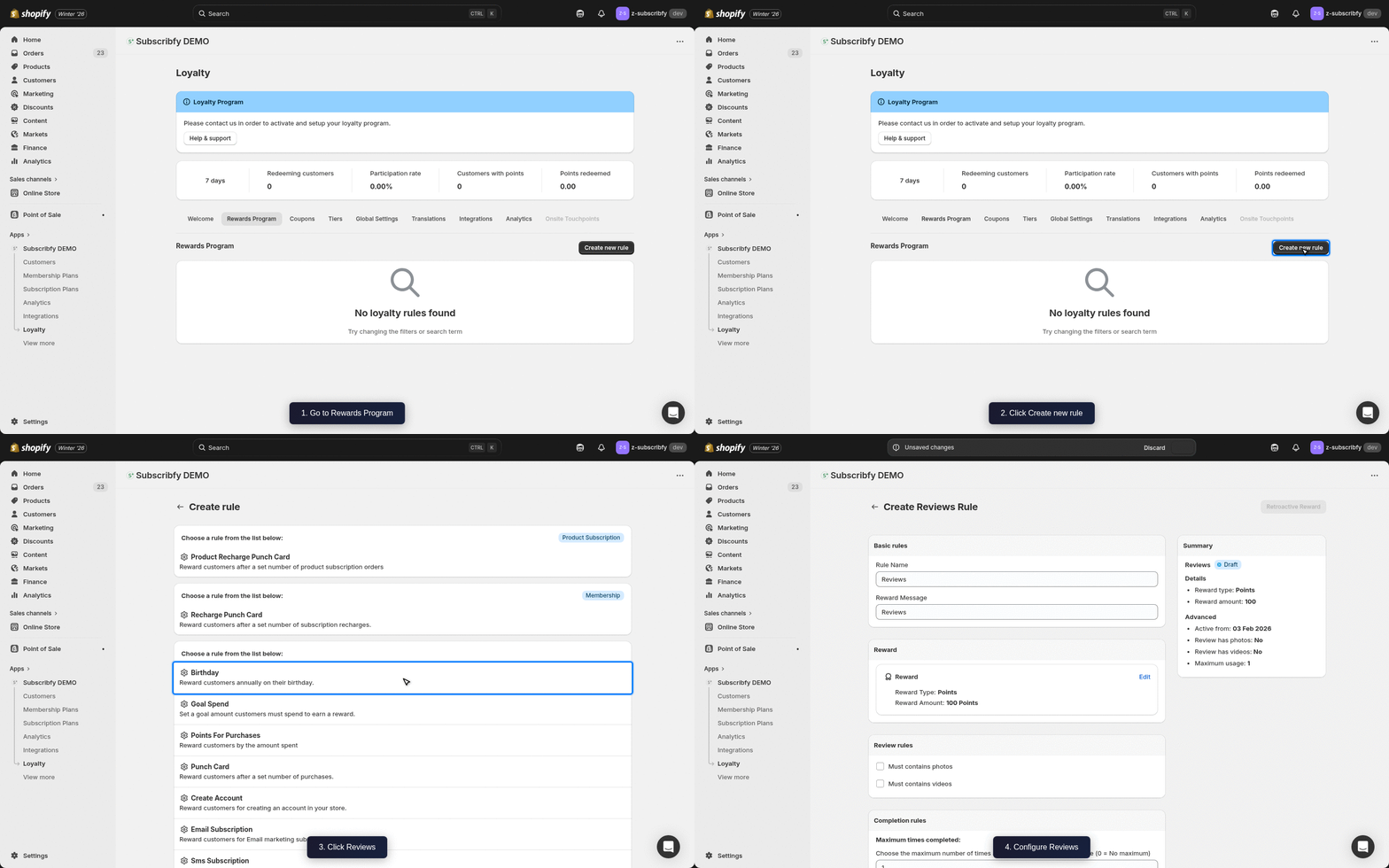
Create the Rule
Go to Subscribfy → Loyalty → Rewards Program tab → Create new rule → Reviews
Configure Basic Settings
| Setting | Description |
|---|---|
| Name | Display name (e.g., "Leave a Review") |
| Reward Amount | Points to award (e.g., 100 points) |
| Reward Message | Message shown when reward is earned |
Configure Advanced Settings (Optional)
| Setting | Description |
|---|---|
| Photo bonus | Extra points for reviews with photos |
| Video bonus | Extra points for reviews with videos |
| Customer tags | Include or exclude customers by their Shopify tags |
| Tier restriction | Limit which tiers can earn this reward |
Save
Click Save and make sure the rule status is ON.
Supported Review Platforms
Subscribfy integrates with:
- Okendo - Full integration with review sync
- Yotpo - Full integration with review sync
- Shopify Reviews - Native Shopify reviews
Configure your review platform integration in Subscribfy → Loyalty → Integrations tab.
How It Works
- Customer purchases a product
- They leave a review on your integrated review platform
- The review is synced to Subscribfy
- Points are awarded automatically
Klaviyo Integration
If you have Klaviyo connected, Subscribfy sends a Subscribfy Reviews Event when a customer earns points for a review.
Event Properties
| Property | Variable Name | Example Value |
|---|---|---|
| Reward Name | event.SubscribfyRewardName | Leave a Review |
| Reward Type | event.SubscribfyRewardType | points |
| Reward Amount | event.SubscribfyRewardAmount | 100 |
| Has Photo | event.SubscribfyHasPhoto | true |
Troubleshooting
Need help? Contact support at support@subscribfy.com