

Loyalty Program
Customer Tag Reward
Reward customers when they receive a specific Shopify tag
Introduction
Award points automatically when customers receive a specific Shopify tag. This is useful for rewarding customers based on actions tracked by other apps or manual tagging.
Enabling Customer Tag Reward
Create the Rule
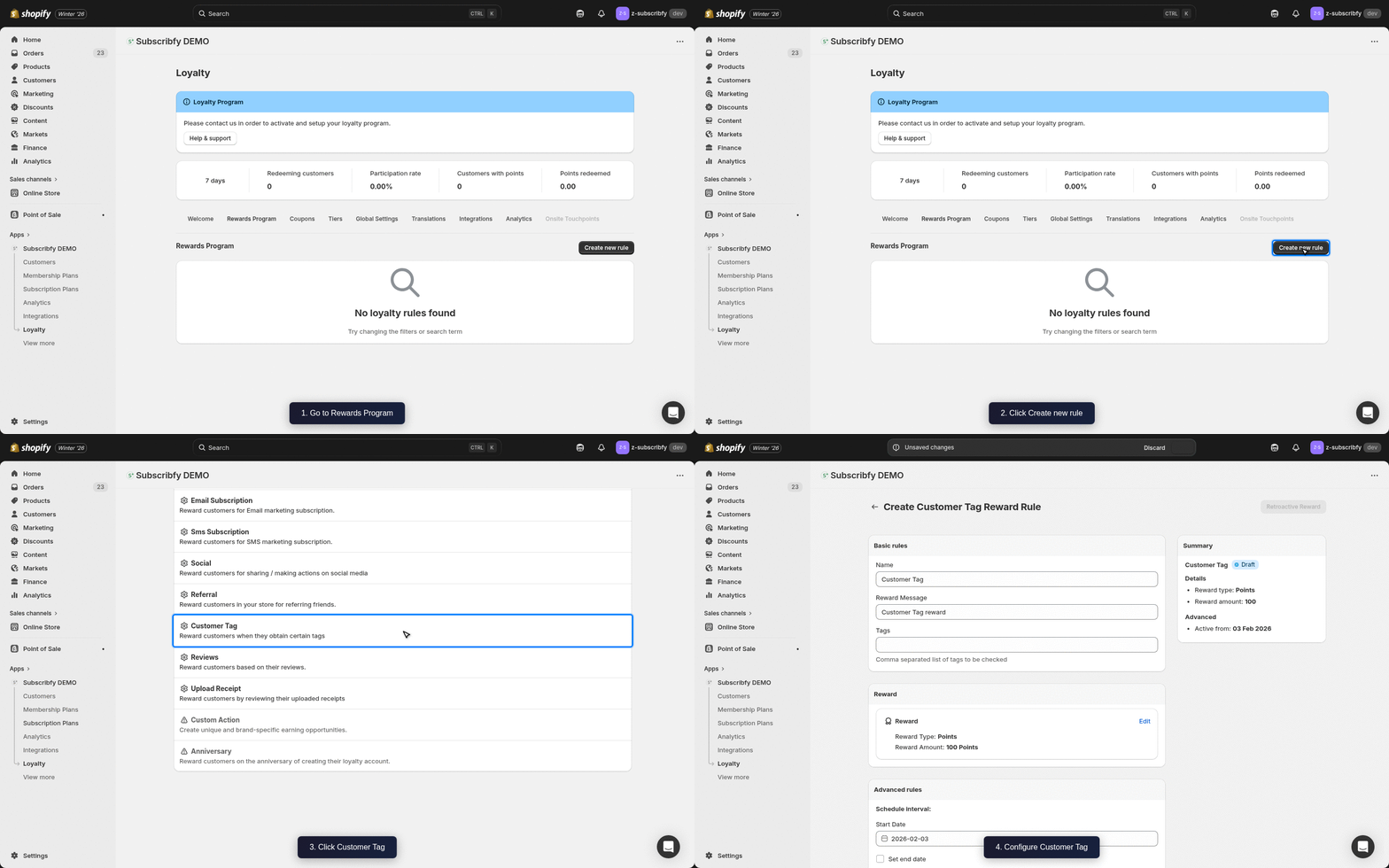
Go to Subscribfy → Loyalty → Rewards Program tab → Create new rule → Customer Tag
Configure Basic Settings
| Setting | Description |
|---|---|
| Name | Display name (e.g., "VIP Customer Bonus") |
| Tag | The Shopify customer tag that triggers the reward |
| Reward Amount | Points to award (e.g., 200 points) |
| Reward Message | Message shown when reward is earned |
Configure Advanced Settings (Optional)
| Setting | Description |
|---|---|
| Schedule | Set start and end dates for the rule |
| Tier restriction | Limit which tiers can earn this reward |
Save
Click Save and make sure the rule status is ON.
How It Works
- A customer receives the specified tag in Shopify (manually or via automation)
- Subscribfy detects the tag change
- Points are awarded automatically
This is a one-time reward per tag. Customers can only earn it once for each specific tag.
Use Cases
- VIP recognition - Reward when tagged as "VIP" by your team
- Event attendees - Tag and reward customers who attended an event
- Survey completion - Reward customers tagged after completing a survey
- App integrations - Other apps can add tags that trigger rewards
Klaviyo Integration
If you have Klaviyo connected, Subscribfy sends a Subscribfy Customer Tag Event when a customer earns points from a tag.
Event Properties
| Property | Variable Name | Example Value |
|---|---|---|
| Reward Name | event.SubscribfyRewardName | VIP Customer Bonus |
| Reward Type | event.SubscribfyRewardType | points |
| Reward Amount | event.SubscribfyRewardAmount | 200 |
| Tag | event.SubscribfyTag | VIP |
Troubleshooting
Need help? Contact support at support@subscribfy.com