

Product Subscription Punch Card
Reward subscribers after a set number of product subscription renewals
Reward subscribers after a set number of product subscription renewals. Add free products to their subscription or give them a discount.
This rule only appears if you have Product Subscriptions enabled.
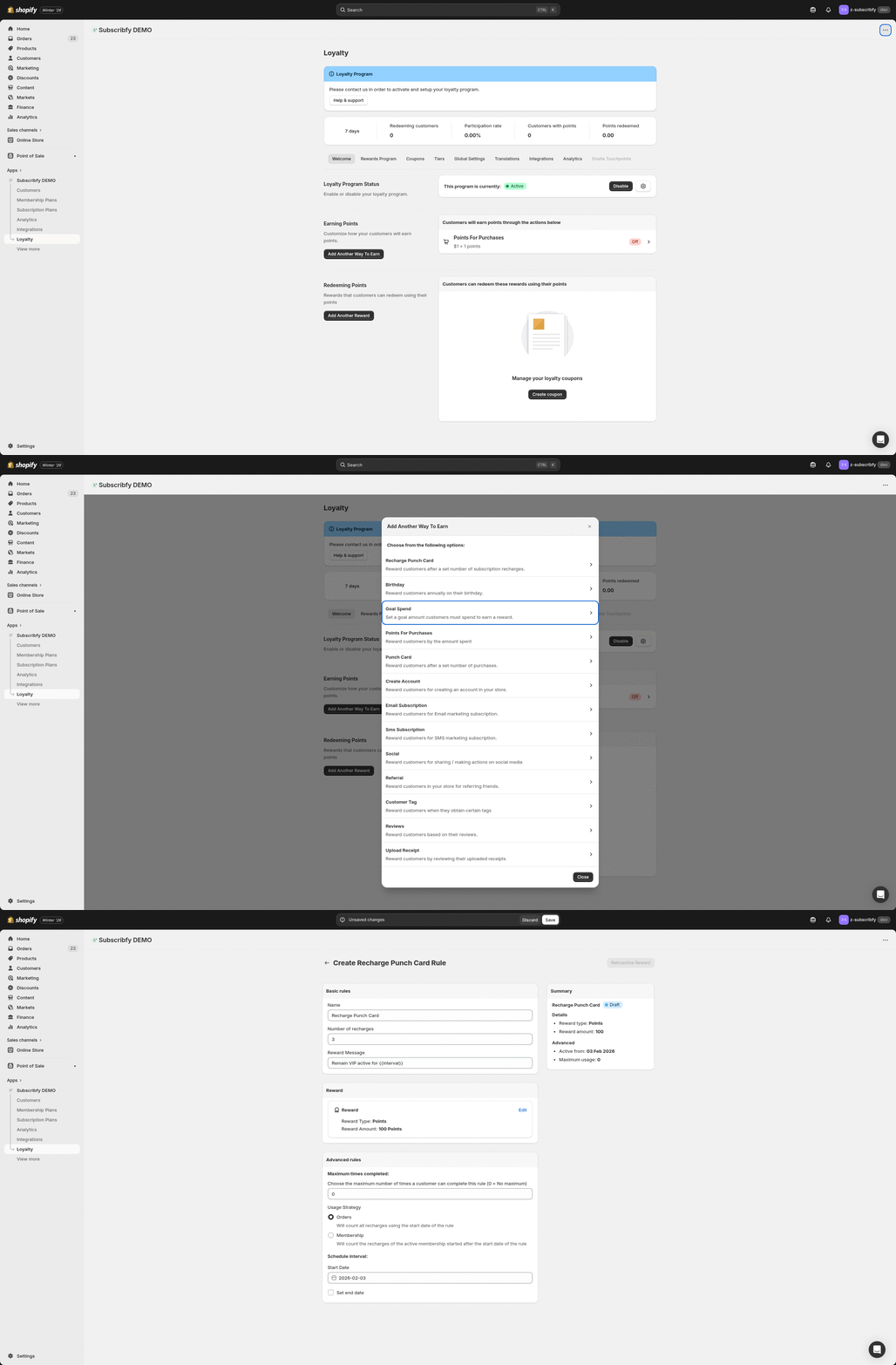
How to Access
Go to Subscribfy → Loyalty → Rewards Program tab → Create new rule → Product Recharge Punch Card
How It Works
- Customer has an active product subscription
- Their subscription renews (order is placed)
- After reaching X renewals, they get the reward
- Reward is applied to their next subscription order
Example: Set "Number of recharges" to 5. After a subscriber's 5th renewal order, they get 20% off their next subscription order.
All Settings
Basic Rules
| Setting | Description |
|---|---|
| Name | Internal name for the rule |
| Number of recharges | How many subscription renewals before the reward is given (e.g., 5 = reward after 5th order) |
| Reward Message | Message shown to customer when they receive the reward |
Selling Plan
Choose which subscription plans this rule applies to:
| Setting | Description |
|---|---|
| Plan Group | Select the selling plan group (required). Only renewals from this group count toward the punch card. |
| Specific Selling Plan | Optionally narrow down to a specific selling plan within the group |
Tip: Use Plan Group to target specific subscription products (e.g., "Coffee Subscription" vs "Snack Box Subscription").
Reward Types
Adds a free product variant to their subscription for X cycles.
| Setting | Description |
|---|---|
| Product Variant | Select which product variant to add as free |
| Cycles | How many subscription orders the free product is included (default: 1) |
Applies a discount to their subscription for X cycles.
| Setting | Description |
|---|---|
| Title | Name of the discount shown to customer |
| Discount Type | Fixed amount (e.g., $5 off) or Percentage (e.g., 15% off) |
| Value | The discount amount |
| Cycles | How many subscription orders the discount applies (default: 1) |
| Apply on each item | For fixed amount: apply discount to each item vs once per order |
Advanced Rules
| Setting | Description |
|---|---|
| Maximum times | How many times a customer can earn this reward (0 = unlimited) |
| Start Date | When the rule becomes active |
| End Date | When the rule expires (optional) |
Tier Restrictions
Optionally limit this rule to customers in specific tiers.
Example Setup
The goal: Give subscribers 20% off their 6th subscription order
Go to Rewards Program → Create new rule
Select Product Recharge Punch Card
Name: "6th Order Discount"
Number of recharges: 6
Select the Plan Group this applies to
Reward: Add subscription discount
Discount Type: Percentage, Value: 20
Cycles: 1
Save
After every 6th subscription renewal, the customer gets 20% off their next order.
Troubleshooting
Need help? Contact support at support@subscribfy.com