

Membership Punch Card
Reward members after a set number of membership billing cycles
Reward members after a set number of membership billing cycles. Give them points, discount codes, free products, or subscription discounts.
This rule only appears if you have Membership enabled.
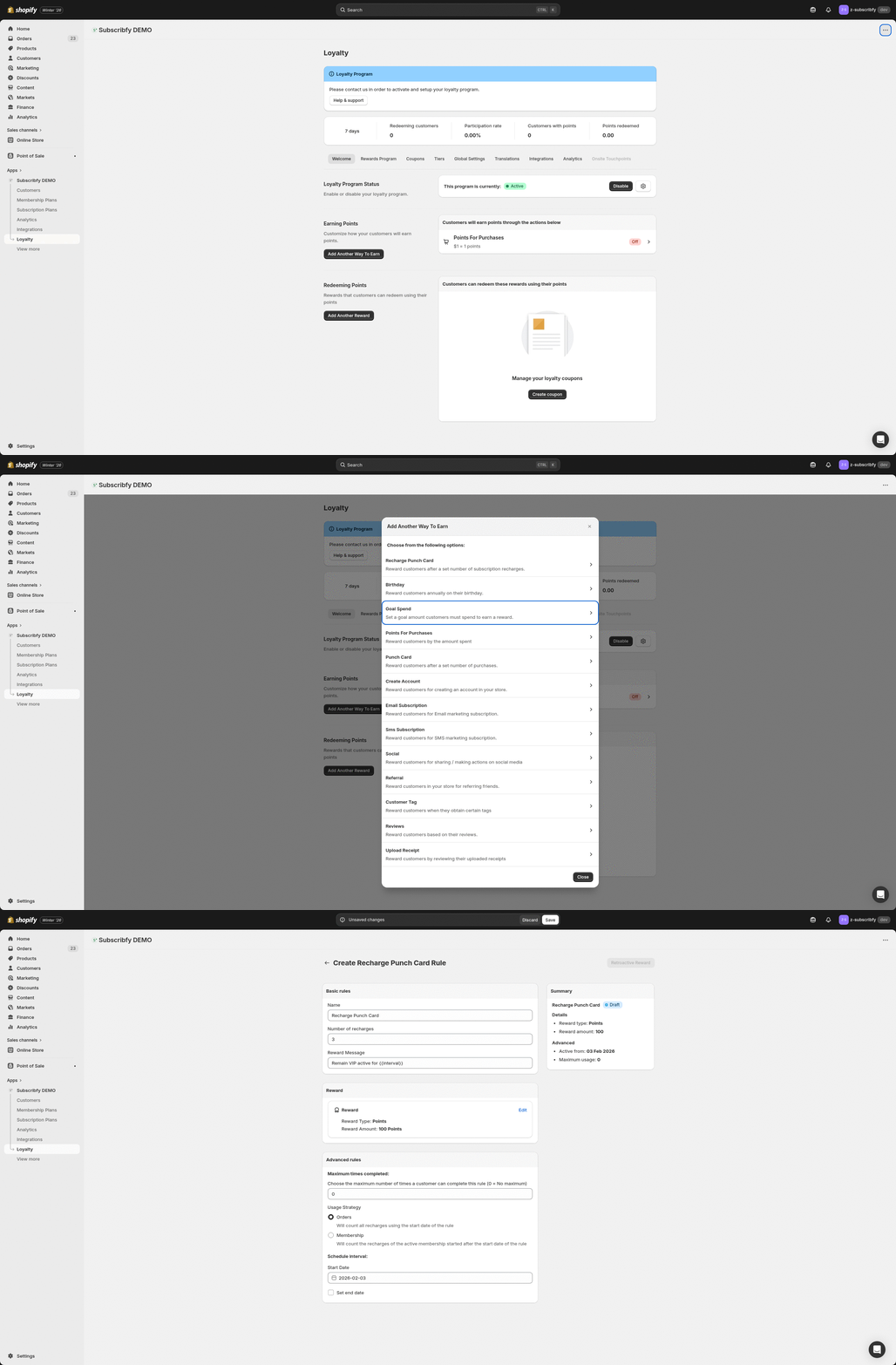
How to Access
Go to Subscribfy → Loyalty → Rewards Program tab → Create new rule → Membership Recharge Punch Card
How It Works
- Customer has an active membership subscription
- Each time their membership billing cycle completes successfully, the recharge count increases
- When they reach the configured number of recharges, the reward is triggered
- The reward is applied based on the type you configured (points, discount code, or subscription action)
Example: Set "Number of recharges" to 3. After a member's 3rd successful payment, they earn the configured reward.
All Settings
Basic Rules
| Setting | Description |
|---|---|
| Name | Internal name for the rule |
| Number of recharges | How many successful billing cycles before the reward is given (e.g., 3 = reward after 3rd payment) |
| Reward Message | Message shown to customer when they receive the reward |
Reward Types
Give customers store credits/loyalty points they can use on future purchases.
| Setting | Description |
|---|---|
| Amount | Number of points to award (default: 100) |
Generate a unique coupon code the customer can use at checkout.
| Setting | Description |
|---|---|
| Code Prefix | Prefix for generated codes (e.g., "Recharge" creates codes like RECHARGE-ABC123) |
| Discount Type | Amount off, Free shipping, or Free product |
| Value | Fixed amount (e.g., $10) or Percentage (e.g., 20%) |
Apply changes directly to the customer's subscription contract.
Type options:
| Type | Description |
|---|---|
| Add free product to the subscription | Adds a free product variant directly to their subscription for X billing cycles |
| Add subscription discount | Applies a discount directly to their subscription for X billing cycles |
Action Settings:
| Setting | Description |
|---|---|
| Cycles | How many billing cycles the action remains active. After X cycles, the subscription reverts to original |
| Product Variant | (For free product) Select which product to add |
| Title | (For discount) Name shown on the subscription |
| Discount Type | (For discount) Fixed amount or Percentage |
| Value | (For discount) The discount amount |
| Apply on each item | (For fixed discount) Apply to each line item vs once per subscription |
Advanced Rules
| Setting | Description |
|---|---|
| Maximum times | How many times a customer can earn this reward (0 = unlimited, repeats every X recharges) |
| Usage Strategy | Orders: Count all recharges since the rule start date. Membership: Count only recharges from the customer's current active membership (resets if they cancel and rejoin) |
| Start Date | When the rule becomes active |
| End Date | When the rule expires (optional) |
Tier Restrictions
Optionally limit this rule to customers in specific VIP tiers.
Example Setup
The goal: Reward loyal members with a free sample after every 3 membership payments
Go to Rewards Program → Create new rule
Select Membership Recharge Punch Card
Name: "3rd Month Free Sample"
Number of recharges: 3
Reward Type: Action
Type: Add free product to the subscription
Select your sample product variant
Cycles: 1
Maximum times: 0 (unlimited)
Save
After every 3rd membership payment, the customer gets a free sample added to their subscription. The sample is included in their next order, then automatically removed.
Klaviyo Integration
When a customer earns a Membership Recharge Punch Card reward, Subscribfy automatically sends an event to Klaviyo.
Event Name: Subscribfy Membership Recharge Punch Card Event
Event Properties
| Property | Description |
|---|---|
| SubscribfyRewardName | Name of the punch card rule |
| SubscribfyRewardType | points or discount_code |
| SubscribfyRewardAmount | The reward value (points amount or discount value) |
| SubscribfyCouponCode | The discount code (only for discount rewards) |
Troubleshooting
Need help? Contact support at support@subscribfy.com