

Goal Spend
Set spending goals to motivate customers to increase their order values
Introduction
Set spending goals to motivate customers to increase their order values. When a customer's order reaches or exceeds your goal amount, they earn bonus points.
Enabling Goal Spend
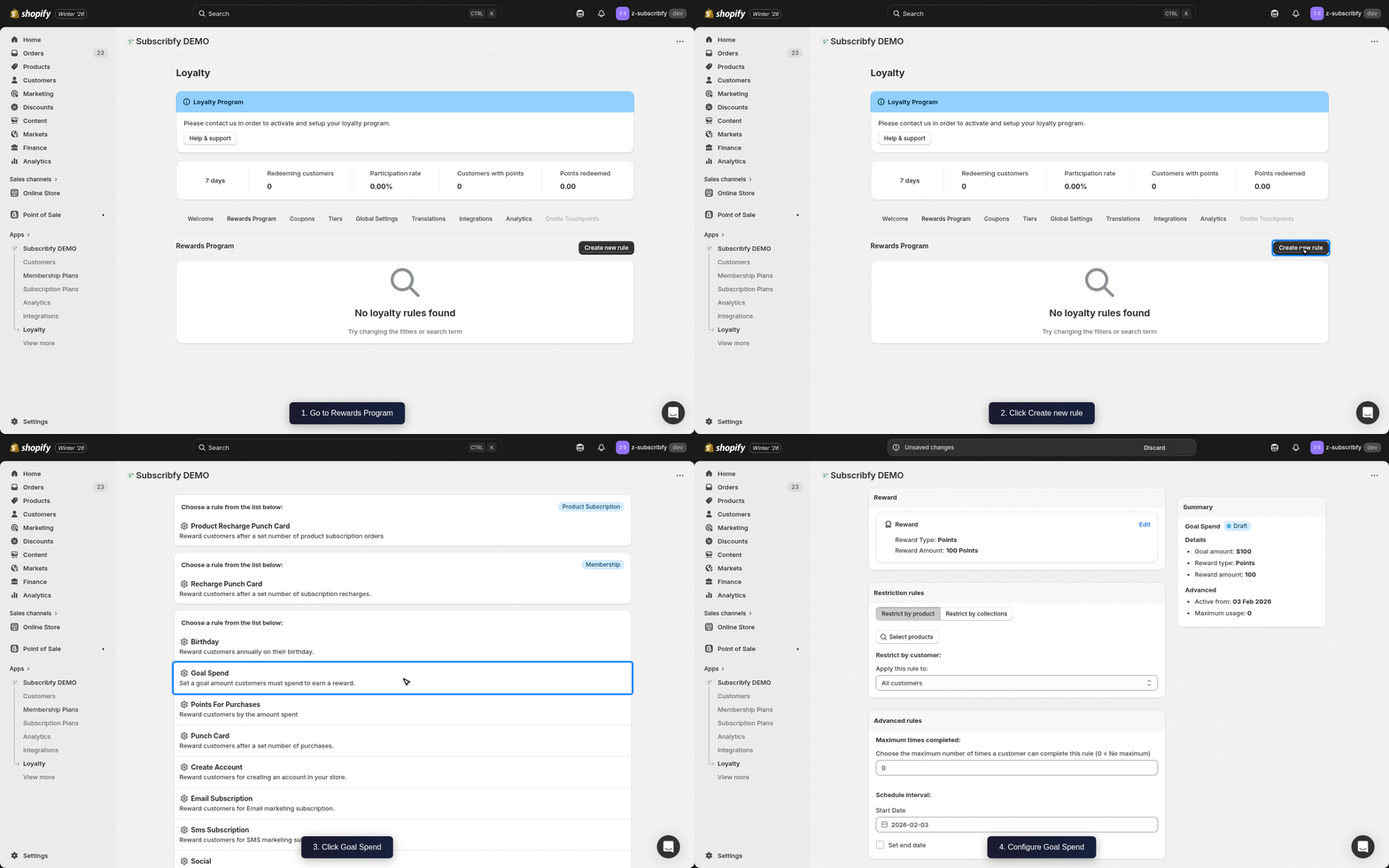
Create the Rule
Go to Subscribfy → Loyalty → Rewards Program tab → Create new rule → Goal Spend
Configure Basic Settings
| Setting | Description |
|---|---|
| Name | Display name (e.g., "Spend $100, Get Bonus Points") |
| Goal Amount | Minimum order amount to trigger reward (e.g., $100) |
| Reward Amount | Points to award when goal is reached |
Configure Advanced Settings (Optional)
| Setting | Description |
|---|---|
| Customer tags | Include or exclude customers by their Shopify tags |
| Product restriction | Only count specific products toward the goal |
| Schedule | Set start and end dates for the rule |
| Tier restriction | Limit which tiers can earn this reward |
Save
Click Save and make sure the rule status is ON.
How It Works
- Customer places an order
- Order subtotal is checked against the goal amount
- If goal is met, bonus points are awarded
Example: With a $100 goal and 500 points reward, any order of $100+ earns 500 bonus points (in addition to regular points-per-dollar).
Tier Multipliers
Each tier has a points multiplier. The goal spend reward is multiplied by the customer's tier multiplier.
Klaviyo Integration
If you have Klaviyo connected, Subscribfy sends a Subscribfy Goal Spend Event when a customer reaches the spending goal.
Event Properties
| Property | Variable Name | Example Value |
|---|---|---|
| Reward Name | event.SubscribfyRewardName | Spend $100 Bonus |
| Reward Type | event.SubscribfyRewardType | points |
| Reward Amount | event.SubscribfyRewardAmount | 500 |
Troubleshooting
Need help? Contact support at support@subscribfy.com